
Multi-Factor Authentication (MFA) is often presented as the solution against phishing attacks, as a second factor (e.g., a temporary one-time password) cannot simply be reused by attackers. As a result, many companies and software vendors require their employees and customers to use MFA. Microsoft also updated its MFA requirements for many Azure cloud services in October 2024, enforcing the use of a second authentication factor without the option to disable it. Additional services will follow starting in 2025.
Overview
Unfortunately, MFA is not the foolproof protection against phishing that it is often believed to be. Due to the way modern web authentication works, attackers can still gain access to sensitive data through so-called Reverse Proxy Phishing, even when MFA is enabled.
What is MFA
Multi-Factor Authentication (MFA) is a security concept in which a user must provide multiple authentication factors during login. These factors are typically something the user knows (e.g., a password), something they have (e.g., a mobile phone or YubiKey), something they are (e.g., a fingerprint), or where they are (e.g., their IP location). The most common combination of two factors is a standard password and a one-time PIN (token), which is received or generated on a mobile device. The token represents possession of the mobile device, can only be used once, and is only valid for a limited period of time (e.g., 30 seconds).
Authentication on the Web
Websites exchange numerous requests with a user’s browser. If authentication were required for every request, users would theoretically have to send all authentication factors with each one. This approach is clearly impractical, especially when using one-time PINs. Repeatedly transmitting passwords would also be both insecure and inconvenient. Modern web applications therefore rely on session cookies. After a successful login, the website issues a unique session cookie that identifies both the user and their authentication status. For all subsequent requests, the browser automatically includes this session cookie, so the username and password do not have to be transmitted again with every request. When the user logs out or after a certain period of inactivity, the cookie is invalidated and the session can no longer be used.
When MFA is enabled, authentication works in exactly the same way. During login, all authentication factors (e.g., password and one-time PIN) are entered, after which a session cookie is issued. This cookie now contains a so-called MFA claim and grants access to the protected functionality.
Phishing for the MFA Claim
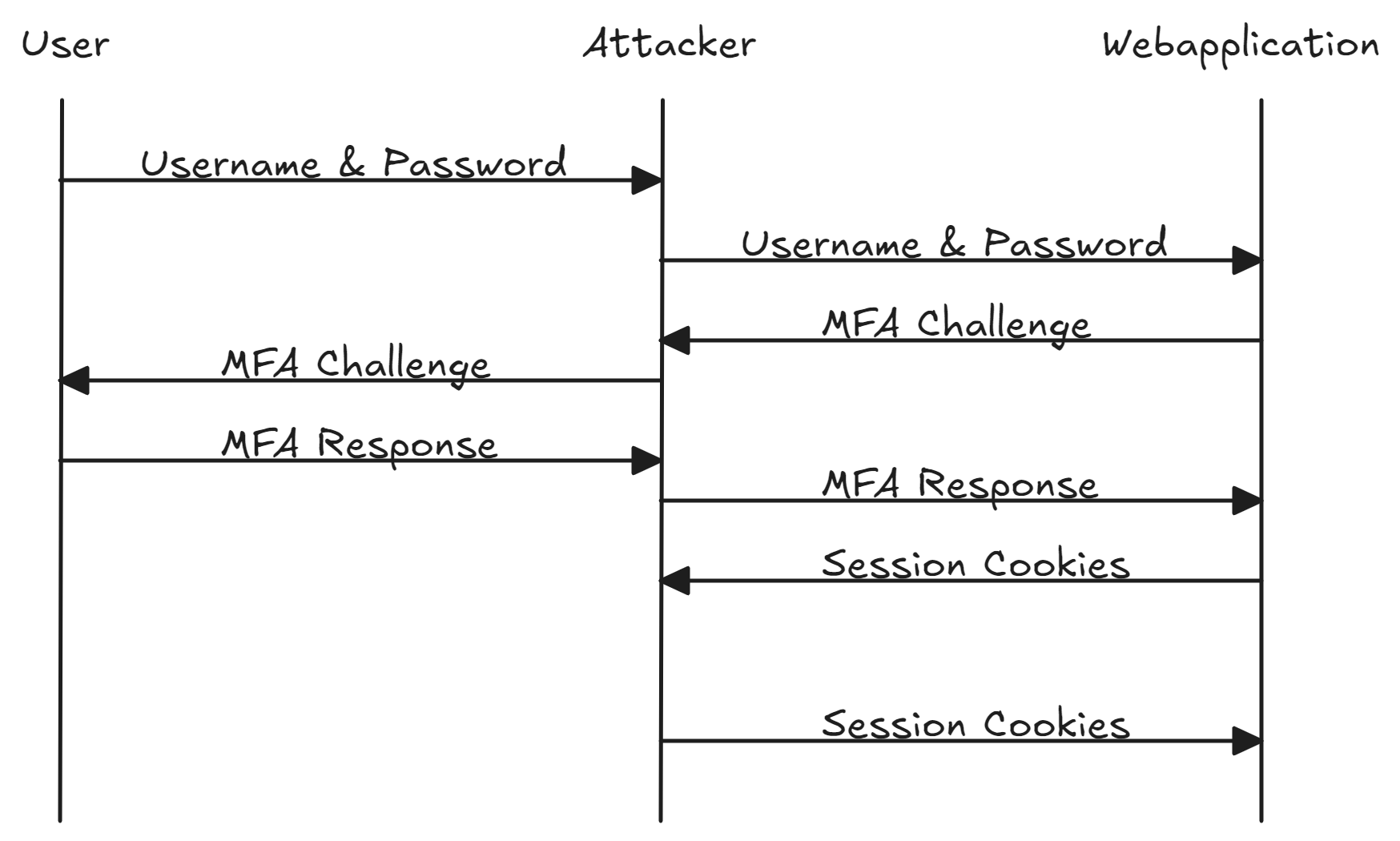
When taking a closer look at MFA authentication, the problem quickly becomes apparent. Regardless of how many authentication factors are required, the issued session cookie ultimately grants the same level of access. Attackers can exploit this behavior during phishing attacks. While traditional phishing campaigns often rely on cloned websites, MFA phishing establishes a Man-in-the-Middle (MitM) position between the user and the legitimate web application. The attacker forwards all authentication factors to the legitimate login endpoint while intercepting the session cookies issued by the application. This MitM attack is completely transparent to the user, who only ever sees the original login page. The intercepted cookies can then be stored locally in the attacker’s browser and used to access the application.
The following video demonstrates what such an attack against Microsoft 365 looks like using Evilginx.
Limitations and Solutions
Most applications require users to re-enter all authentication factors for critical operations (e.g., resetting a password), even when an active session already exists. This is one of the most widely implemented countermeasures against complete account takeover through MFA phishing. Despite this limitation, session phishing remains extremely effective as an initial attack vector. Access to internal information, emails, and files represents a goldmine for attackers. The information obtained, together with trusted internal sender addresses, can be used to establish credibility with other employees, significantly increasing the likelihood of successfully delivering malware.
Another effective countermeasure is the use of phishing-resistant MFA solutions, such as FIDO2 security keys (e.g., YubiKey). Since the security key is cryptographically bound to the domain origin for which it was registered, reverse-proxy Man-in-the-Middle phishing attacks fail in most cases because the attacker cannot impersonate the original domain. Some websites attempt to implement a similar domain origin verification mechanism on their login pages using JavaScript. While such browser-side verification increases the difficulty of these attacks, it should not be relied upon as a sole defense, since attackers can analyze and manipulate client-side JavaScript code to bypass these mechanisms.
Employees remain one of the most important pillars in defending against phishing attacks. In addition to providing training on how to recognize phishing emails, CERTAINITY places particular emphasis on fostering a company culture in which nobody has to feel ashamed of becoming the victim of a phishing attack—because it can happen to anyone. Employees should feel comfortable reporting suspected phishing incidents so that appropriate countermeasures can be initiated as quickly as possible.
Our awareness page, which is linked after successful phishing simulations, can be found here: https://certainity.com/phishing-awareness/
How CERTAINITY Can Help
CERTAINITY offers comprehensive solutions to strengthen your organization’s resilience against phishing attacks:
- Standard Phishing Scenarios: Simulate targeted phishing attacks against your employees to analyze how they respond to threats—for example, whether they click on malicious links, enter their passwords, or notify the IT department.
- Security Awareness Training: Our awareness training teaches employees how to recognize phishing attempts and respond to them safely. This increases overall awareness of phishing attacks and establishes effective prevention strategies.
- Attack Simulations and Security Assessments: CERTAINITY provides comprehensive attack simulations, including Red Team Assessments and Initial Compromise Assessments. As part of these engagements, we also employ the reverse proxy phishing techniques described above for MFA-protected logins to evaluate your organization’s resilience against targeted, technically sophisticated phishing attacks and identify potential weaknesses.
Feel free to contact us at sales@certainity.com to discuss a tailored solution that addresses the specific requirements and challenges of your organization.